agents-handoff documentation
agents-handoff turns an AI working session — chat turns, tool calls, reasoning, however the client stored it — into a folder of plain files that a different agent, a different harness, or a colleague can read and continue from without the original chat. It builds from a transcript or an adapter export, keeps a hash chain so a handoff can be re-verified, and merges later turns into the same session instead of duplicating it.
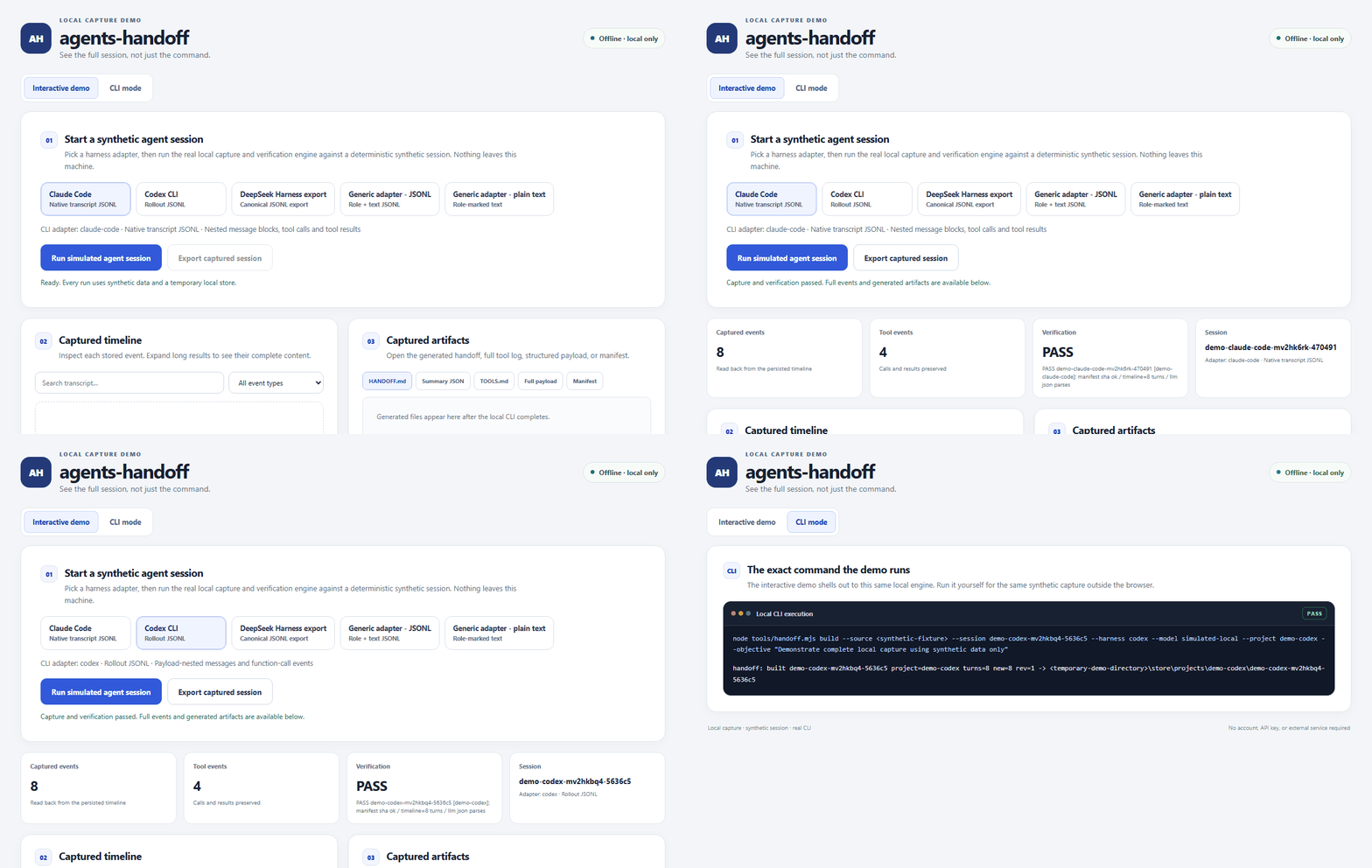
Interactive local demo
Run the real capture CLI against a fast, deterministic synthetic agent session. Switch among the four documented capture adapters and five deterministic input-format scenarios, inspect every captured event and generated artifact, expand long tool results, and export the synthetic result. The demo has no model API, no external service, and no product-version label in its interface.
Start it from a repository checkout with node examples/demo/server.mjs, then open the localhost URL it prints. Read the demo instructions.
Quick start
# 1. Install the skill into every harness found on this machine
npx agents-handoff --all

# 2. Build a handoff from a transcript
node tools/handoff.mjs build --source transcript.jsonl --project my-project

# 3. Find it, read it, check it
node tools/handoff.mjs list
node tools/handoff.mjs show <id-prefix>
node tools/handoff.mjs verify <id-prefix>
build also accepts --session, --harness, --model and --objective. Run
node tools/handoff.mjs config to see which store root the engine resolved and why.
--all installs into every harness present on the machine; --claude, --codex, --agents
and --skills-dir <dir> pick one or several instead, and npx agents-handoff --update brings
every copy on the machine up to date in one run. npx agents-handoff --verify-package then
proves the copy on disk is identical to the tarball npm is serving for its version, while
npx agents-handoff --doctor reports what is installed where and whether each copy still
matches the record written when it was installed. The installer’s full surface is in
CLI.md and INSTALL.md.
Where to start
| If you want to… | Read |
|---|---|
| install it | INSTALL.md |
| prove an install matches the published package | INSTALL.md and CLI.md |
| understand how the pieces fit | ARCHITECTURE.md |
| look up a command, flag or exit code | CLI.md |
| know exactly what a handoff folder holds | FORMAT.md |
| see captured sessions, and check them | SESSIONS.md |
| fix something that is not working | TROUBLESHOOTING.md |
| feed it a transcript from your own tool | INTEGRATION.md and ../refs/ADAPTERS.md |
| understand what the hashes prove | PROVENANCE.md |
All pages
| Document | Contents |
|---|---|
| INSTALL.md | Installer commands, install locations, requirements |
| UPGRADE.md | Updating an installation, pinning a version, what a version change touches |
| UNINSTALL.md | Removing an installation, and which files are deliberately kept |
| ARCHITECTURE.md | The layers, the data flow, the store root, the write-safety discipline, the boundaries |
| CLI.md | Every executable, verb, flag, exit code, environment variable and file written |
| FORMAT.md | Handoff folder layout, every file in it, the manifest and the schemas |
| SESSIONS.md | Session index: a sample store, its captured sessions, and how to verify and re-render them. The same rows are published as sessions.json (schema 1.0-session-feed) for anything that would rather read data than markdown, and the page filters in the browser |
| INTEGRATION.md | Embedding the engine, configuration and environment, CI and pipeline use |
| LEVEL4.md | Dynamic runtime layer: runtime verbs, gates and promotion |
| LEVEL5.md | Collaborative dispatch: routing a handoff to another agent |
| PERMISSIONS.md | Permission levels, risk classes, and the policy file |
| SECURITY.md | What is read and written, secrets, malicious input, guarantees not made |
| COMPATIBILITY.md | Platforms, Node versions, input formats, exit codes |
| PROVENANCE.md | The hash chain, how to verify it, what it cannot prove |
| TROUBLESHOOTING.md | Symptom, cause and fix, keyed to the real exit codes |
| CONTRIBUTING.md | Test suite, project layout, how to add an adapter |
| Changelog | What changed in each release, and how to add an entry |
| ../refs/ADAPTERS.md | Canonical input shape and how each session source maps onto it |
Engine commands
| Command | Effect |
|---|---|
build --source <file> |
Build or update a handoff from a transcript |
--handoff --source <file> |
Alias of build |
list [project-or-prefix] |
List sessions, newest first |
show <id-prefix> |
Print the rendered brief |
verify <id-prefix> |
Re-check the hash chain |
rename <id-prefix> <project> |
Move a session to another project |
retitle <id-prefix> <name> |
Give a session a readable name |
config |
Report the resolved store root, its source and the schema path |
Zero dependencies, Node 18 or newer. CLI.md has the full command surface, including the runtime layer, bounded execution and the capability registry. See ../README.md for the repository overview and ../SKILL.md for the skill definition.